what is Smart Agent?
Smart Agent is an application to provide a base for agents to connect buyers and suppliers. In this app, you can manage your bills and supplier and buyer list and work daily collections. In the Smart Agent app, you can Generate invoices by just filling in the details and saving time. You can check other features on Smart Agents’ website – https://online.smartagent.one/
You can Download the Smart Agent Software on various devices. Here is the Guidance for all devices you want to install.
Your Devices
1 – click here for Android Phone
2 – click here for Windows PC
3 – click here for Apple Macbook
1: Android Installation
How to Install the Smart Agent App on Your Android Phone?
Step 1 – Open Smart Agent Website in Google Chrome
For installing Smart Agent App on your Mobile Phone, first of all, you have to open your chrome browser and go to the URL section and type our Website’s link. Or you can go to our Smart Agent website just by clicking the link given here.
Smart Agent – https://online.smartagent.one/
Step 2 – Download Smart Agent App
By clicking the link given above you will land on our Smart Agent website
Option 1: Add to Home Screen
You are on the Smart Agent website now, Wait for a while the pop-up will appear on your screen ” Add Smart Agent to Home Screen ” Click on that Pop-up.
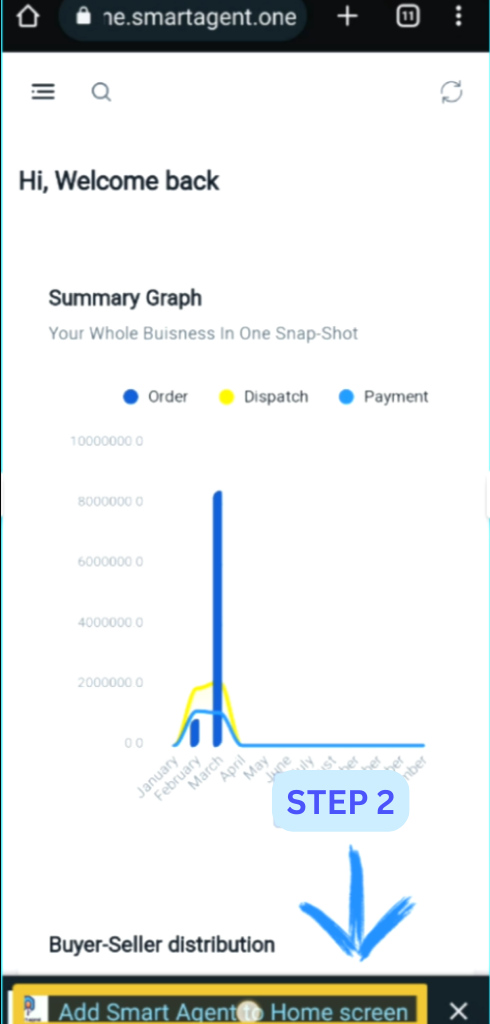
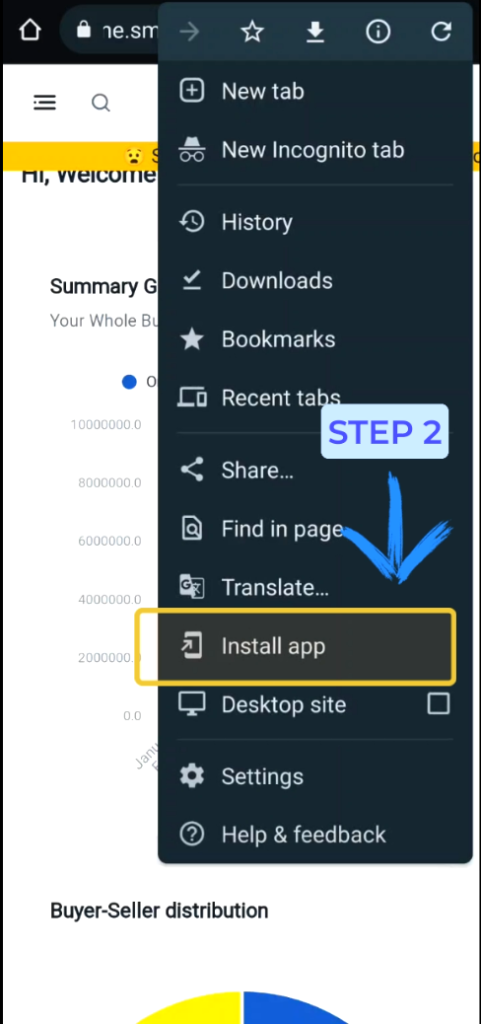
Option 2: Install the App From More…
If the Pop-up is taking more time then you can download the app from the more option Chrome browser. On the Smart Agent website, Look at the top-right of the screen and Click on the three dots Then options will appear Click on ” Install App ”
Step 3 – Install Your Smart Agent App
By clicking on ” Add to Home Screen ” or by clicking on Install app in both ways You will get another pop-up with the option to install the Smart Agent App. Click on Install to Install Your Smart Agent App on Your Android Phone.
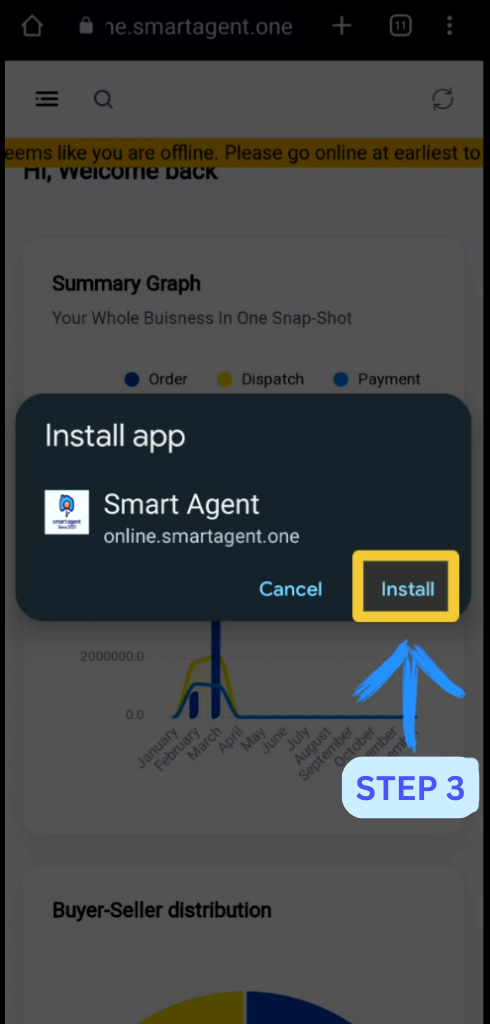
You have completed the process, Now you can use the Smart Agent App on your Android Phone.
Complete Guide with Youtube Video
If you are facing a problem with installing the app then watch this video for visual and simple steps
2: Windows Installation
How to Install the Smart Agent Software on Your Windows PC?
Step 1 – Open Smart Agent Website in Google Chrome
To install Smart Agent Software on Your PC, first of all, you have to open your Chrome browser and go to the URL section and type our Website’s link. Or you can go to our Smart Agent website just by clicking the link given here.
Smart Agent – https://online.smartagent.one/
Step 2 – Download Smart Agent Software
By clicking the link given above you will land on our Smart Agent website
You are on our website right now, look at the top right side of the page in the URL part you have given three buttons bookmark, share, and download button you have to click on the download button to download the software to your computer.
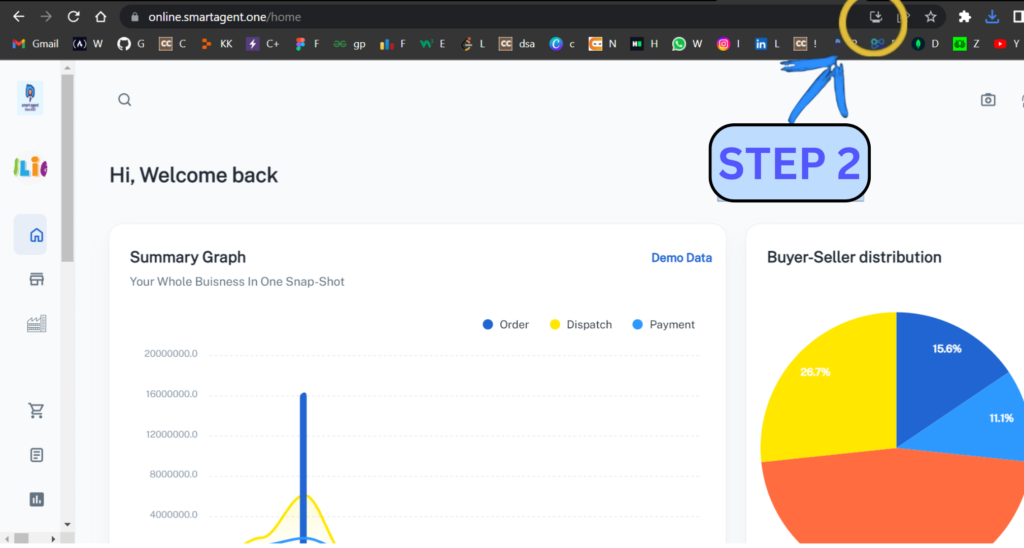
Just by clicking the download button given in the URL section, you will have a pop-up to install the software
Step 3 – Install Your Smart Agent App
After clicking on Download you will have a pop-up like this.
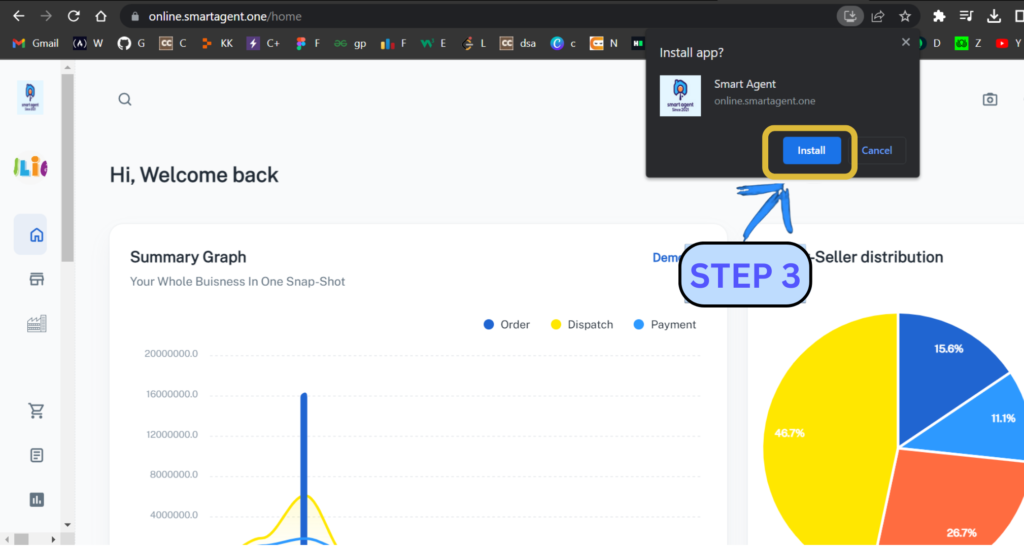
Now to install Smart Agent Software Just click the ” install ” button, And all set you are ready to use Smart Agent Software on your Personal Computer. You can use Smart Agent’s all features on your computer now.
Complete Guidance with Youtube Video
If you are facing a problem with installing the app then watch this video for visual and simple steps
3: MacBook Installation
How to Install the Smart Agent Software on Your Apple Macbook?
Open Smart Agent Website in Google Chrome
To install Smart Agent Software on Your PC, first of all, you have to open your Chrome browser and go to the URL section and type our Website’s link. Or you can go to our Smart Agent website just by clicking the link given here.
Smart Agent – https://online.smartagent.one/
Step 1 – Download Smart Agent Software
By clicking the link given above you will land on our Smart Agent website
You are on our website right now, look at the top right side of the page in the URL part you have given three buttons bookmark, share, and download button you have to click on the download button to download the software to your computer.
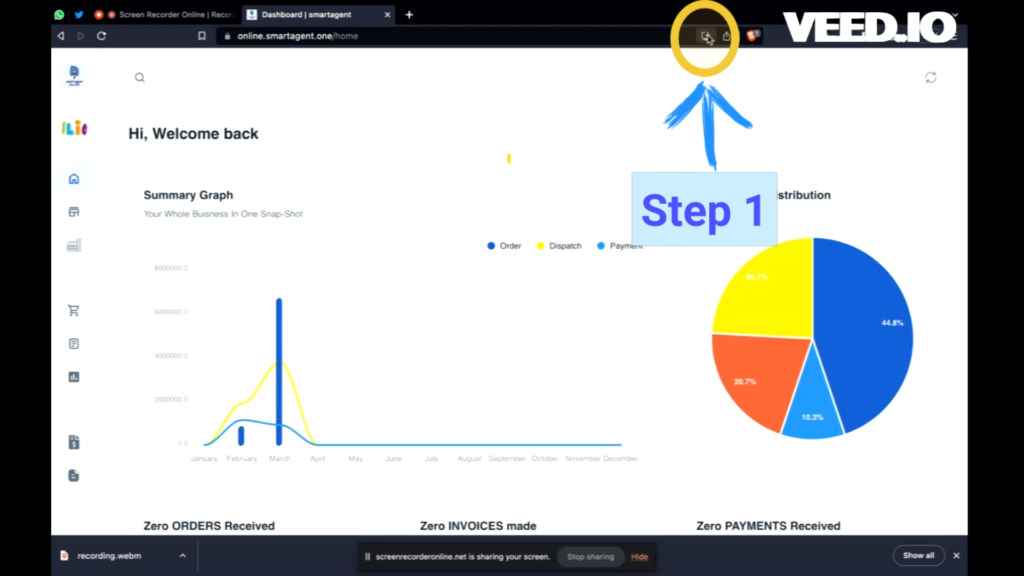
Step 2 – Install Your Smart Agent App
After clicking on Download you will have a pop-up like this.
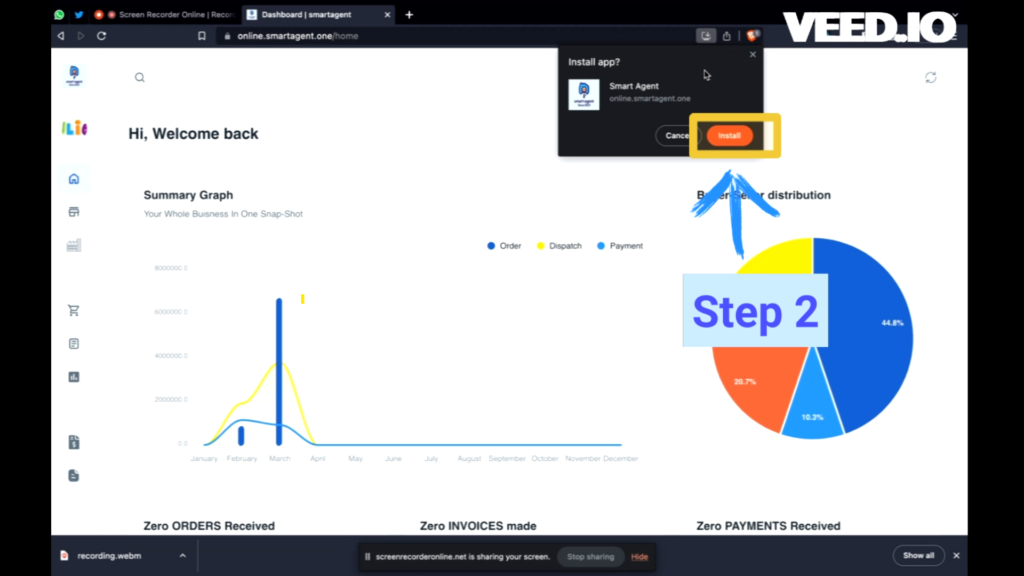
Now to install Smart Agent Software Just click the ” install ” button, And all set you are ready to use Smart Agent Software on your Personal Computer. You can use Smart Agent’s all features on your computer now.
Complete Guidance with Youtube Video
If you are facing a problem with installing the app then watch this video for visual and simple steps